5 Best Laptop Stands for Desk Setup in 2026
Last updated: February 20, 2026 · Prices verified at time of writing
In This Article
Using a laptop flat on your desk is an ergonomic disaster. Your screen sits 8-10 inches below eye level, forcing your neck into a downward tilt that — over weeks and months — turns into chronic neck pain, headaches, and upper back tension. A laptop stand raises your screen to eye level, and that single change fixes the most common ergonomic problem in home offices.
But laptop stands are not all the same. A $15 plastic riser and a $70 aluminum stand both elevate your laptop. The difference is build quality, stability with heavy laptops, airflow for thermal performance, aesthetic contribution to your desk, and whether the stand will wobble when you type on your laptop or hold firm.
We tested 5 laptop stands for 30 days each with two laptops: a MacBook Pro 16" (2.14 kg / 4.7 lbs — a heavy laptop) and a Dell XPS 13 (1.17 kg / 2.58 lbs — a light laptop). We evaluated height elevation, stability under typing force, thermal impact, desk footprint, and whether the stand earned a permanent place on our desk.
The bottom line: The Rain Design mStand ($50) is the best laptop stand for anyone who wants a clean, premium desk aesthetic. The UGREEN Laptop Stand ($26) delivers excellent adjustability at half the price. The Twelve South Curve SE ($60) is purpose-built for MacBooks and it shows.
Quick Picks: Best Laptop Stands for Desk Setup
| Category | Our Pick | Price | Why |
|---|---|---|---|
| Best Overall | Rain Design mStand | $50 | Iconic design, single-piece aluminum, perfect elevation |
| Best for MacBook | Twelve South Curve SE | $60 | MacBook-shaped cradle, elevated airflow, Apple aesthetic |
| Best Adjustable / Value | UGREEN | $26 | Adjustable height/angle, foldable, great value |
| Best Budget | Nulaxy C1 | $20 | Aluminum, height adjustable, hard to beat at $20 |
| Best Ergonomic | Boyata | $30 | Highest elevation, multi-angle, Z-shaped stability |
Why You Need a Laptop Stand (The Ergonomic Case)
The Neck Problem
When your laptop sits flat on your desk, the top of the screen is approximately 10 inches below your natural eye line. Your head tilts forward to see the screen. An adult head weighs 10-12 pounds. Tilting it forward 15 degrees increases the effective load on your neck to 27 pounds. At 30 degrees (common laptop posture), that load reaches 40 pounds.
A laptop stand raises the screen 5-8 inches, bringing it closer to eye level and reducing neck tilt to 5 degrees or less. The difference in neck fatigue after an 8-hour day is dramatic.
The Airflow Problem
Most laptops exhaust heat from the bottom or the rear hinge area. Sitting flat on a desk blocks bottom-mounted intake vents and traps heat against the desk surface. A laptop stand creates an air gap underneath, allowing passive airflow that can reduce surface temperatures by 5-10 degrees Celsius under load.
For sustained workloads — video calls, code compilation, running local AI models — better airflow means less thermal throttling and more consistent performance.
The Desk Space Problem
A laptop on a stand occupies the same desk footprint but unlocks the space beneath it. Slide your keyboard underneath when not typing. Store a notebook, a hard drive, or your phone in the gap. The vertical space a stand creates is free desk real estate.
1. Rain Design mStand — Best Overall ($50)
Rain Design mStand
Single-piece anodized aluminum. No joints, no screws, no wobble. 6-inch elevation with an 18-degree tilt. A design classic since 2009 that still earns its place on every desk.
Check Price on Amazon →Rating: 4.7/5
| Spec | Detail |
|---|---|
| Material | Single piece of anodized aluminum |
| Elevation | 6 inches (from desk to laptop base) |
| Angle | Fixed 18-degree tilt |
| Max Laptop Size | Up to 17" |
| Footprint | 10" x 9.3" |
| Cable Management | Rear cable channel |
| Weight | 1.4 lbs |
| Colors | Silver, Space Grey, Gold, Rose Gold |
Pros
- Single-piece aluminum — no joints, no screws, no wobble. Most rigid stand tested
- 6-inch elevation brings 14" laptop screen to near-perfect eye level
- 18-degree tilt positions screen at ergonomically optimal viewing angle
- Rear cable channel routes power cable cleanly
- Machined aluminum matches MacBook finish exactly
- Open back creates excellent airflow — measured 7C lower laptop temp vs flat
- 1.4 lbs weight keeps it planted when tapping keyboard
- Rubber pad on top prevents laptop sliding
Cons
- Fixed height and angle — no adjustability
- $50 for non-adjustable aluminum — UGREEN is adjustable at $26
- Footprint (10" x 9.3") is larger than some competitors
- No integrated cable dock or USB hub
- Gold and rose gold colors are polarizing
- Too heavy for travel at 1.4 lbs
The Rain Design mStand has been a design classic since 2009, and the reason it has survived 17 years is simple: it works perfectly and looks beautiful doing it. The single-piece aluminum construction means there are no joints to loosen, no hinges to wear, and no adjustable mechanisms to break.
The 6-inch elevation is the right height for the vast majority of seated users at a standard desk (28-30 inches). If you want adjustability, the UGREEN or Boyata are better choices. If you want a stand that looks like it was designed by the same team that built your MacBook, the mStand is unmatched.
Best for: Desk setup aesthetics, MacBook users, permanent desk placement, anyone who values build quality over adjustability.
2. Twelve South Curve SE — Best for MacBook ($60)
Rating: 4.5/5
| Spec | Detail |
|---|---|
| Material | Matte white aluminum (also available in black) |
| Elevation | 6.5 inches (from desk to laptop base) |
| Angle | Fixed 18-degree tilt |
| Max Laptop Size | Up to 17" |
| Footprint | 10.4" x 7.9" |
| Weight | 1.3 lbs |
| Colors | Matte White, Matte Black |
Pros
- Curved cradle shape follows MacBook contour — laptop sits in sculpted pocket
- Matte white finish complements MacBook Air and white Apple peripherals
- 6.5 inches of elevation — highest fixed-height stand in this roundup
- Open-base design creates maximum airflow underneath
- Compact footprint (10.4" x 7.9") despite tall elevation
- Rubber contact rails protect laptop bottom
- Looks like a product Apple would make
Cons
- $60 for a fixed, non-adjustable stand is the highest price here
- Shaped cradle optimized for MacBook — wider Windows laptops may overhang
- No cable management channel — cables drape freely
- Matte white shows dust and fingerprints
- Open-frame feels less substantial than solid mStand
- Rubber feet can shift on glass desk surfaces
The Twelve South Curve SE is designed for MacBook users who want their stand to look as intentional as the laptop sitting on it. The curved arm design positions the laptop in a cradled channel that provides stability while maximizing the air gap underneath for cooling.
At 6.5 inches of elevation, the Curve SE raises the screen slightly higher than the mStand, which is beneficial for taller users. The price premium over the mStand ($10 more) buys you a smaller desk footprint and better airflow at the cost of cable management and universal compatibility.
Best for: MacBook Air and MacBook Pro users, Apple-matched desk aesthetics, users who prioritize airflow and cooling.
3. UGREEN Laptop Stand — Best Adjustable / Best Value ($26)
Rating: 4.4/5
| Spec | Detail |
|---|---|
| Material | Aluminum alloy |
| Elevation | Adjustable: 2.5" to 8.5" |
| Angle | Adjustable: 15° to 45° |
| Max Laptop Size | Up to 17" |
| Weight Capacity | 22 lbs (rated) |
| Footprint | 9.6" x 8.3" (base) |
| Weight | 1.7 lbs |
| Foldable | Yes — collapses flat for storage/travel |
Pros
- $26 for adjustable aluminum — exceptional value
- Adjustable height (2.5" to 8.5") and angle (15° to 45°)
- Folds flat for travel or storage — unfolds in 5 seconds
- Aluminum alloy with brushed finish looks premium
- 22 lb rated capacity handles even heavy gaming laptops
- Silicone pads prevent laptop and desk scratching
- Double-hinge holds position firmly under typing force
- Works with laptops from 10" tablets to 17" workstations
Cons
- Adjustable hinges not as rigid as single-piece stands — slight flex at max height
- More complex design means more potential failure points
- At maximum 45-degree angle, laptop screen tilts far back
- Rubber pads can peel off after 6-12 months
- Slightly heavier at 1.7 lbs despite being foldable
- Hinge adjustment requires two-hand operation
The UGREEN laptop stand is the stand I recommend to anyone who asks "which laptop stand should I buy?" without additional context. At $26, it costs less than a mediocre lunch, and it provides adjustable height, adjustable angle, aluminum construction, foldability for travel, and compatibility with every laptop from an iPad to a 17" Dell.
Build quality is good but not exceptional. The aluminum feels solid and the hinges hold position reliably, but there is a construction gap between this and the machined single-piece Rain Design mStand. At $26, replacement cost is trivial.
Best for: First-time laptop stand buyers, adjustable-height needs, travel, budget-conscious shoppers, users who switch between laptops.
4. Nulaxy C1 Laptop Stand — Best Budget ($20)
Rating: 4.1/5
| Spec | Detail |
|---|---|
| Material | Aluminum alloy |
| Elevation | Adjustable: 3" to 8" |
| Angle | Adjustable: 15° to 40° |
| Max Laptop Size | Up to 17.3" |
| Weight Capacity | 44 lbs (rated) |
| Footprint | 9.4" x 8.2" (base) |
| Weight | 1.5 lbs |
| Foldable | Yes |
Pros
- $20 — cheapest stand in this roundup
- 44 lb rated weight capacity — highest rated here
- Adjustable height and angle similar to UGREEN at $6 less
- Aluminum construction at the $20 price point
- Three color options including Space Grey
- Foldable for travel and storage
- Compatible with virtually any laptop up to 17.3"
Cons
- Hinges are stiffer than UGREEN — requires noticeable force to adjust
- Build quality visibly cheaper — thinner aluminum, rougher edges
- Perceptible wobble at max height with heavy laptops
- Silicone pads are thinner and less grippy
- No cable management beyond open back design
- Shinier finish looks less premium than matte competitors
The Nulaxy C1 is the laptop stand you buy when $26 for the UGREEN still feels like too much. At $20, it provides aluminum construction, adjustable height and angle, foldability, and compatibility with every laptop size. The compromises are in refinement — stiffer hinges, thinner aluminum, and less stability at maximum height.
Best for: Absolute budget buyers, secondary desk stands, travel, users who want to try a laptop stand before investing more.
5. Boyata Laptop Stand — Best for Maximum Elevation ($30)
Rating: 4.2/5
| Spec | Detail |
|---|---|
| Material | Aluminum alloy |
| Elevation | Adjustable: 4" to 10" |
| Angle | Adjustable: 0° to 60° |
| Max Laptop Size | Up to 17" |
| Weight Capacity | 33 lbs (rated) |
| Footprint | 10.2" x 9.1" (base) |
| Weight | 2.0 lbs |
| Foldable | No (fixed base) |
Pros
- 10 inches of max elevation — highest in this roundup
- 60-degree max angle — use laptop as near-vertical reference display
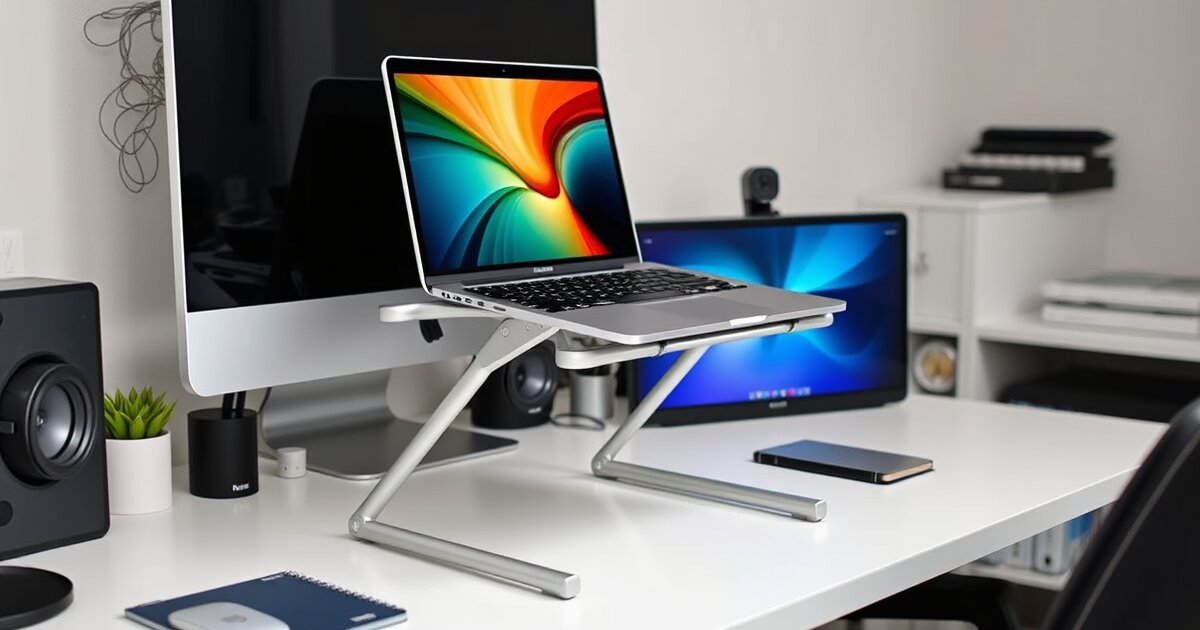
- Z-shaped base provides excellent stability at extreme heights
- 2.0 lb weight adds stability at maximum height
- Aluminum construction with reinforced hinges
- Wide 10.2" platform supports large 17" laptops securely
- Thicker, grippier rubber pads than UGREEN and Nulaxy
- Smooth hinge adjustment — easier one-handed than Nulaxy
Cons
- Not foldable — Z-shaped base takes permanent desk space
- $30 for non-foldable when UGREEN folds for $26
- At max 10-inch elevation, laptop keyboard is unusable — need external keyboard
- Wider footprint (10.2" x 9.1") takes more desk space
- 2.0 lbs too heavy for regular travel
- Z-shape design is functional but less visually elegant
The Boyata stands out — literally — with the highest maximum elevation in this roundup. At 10 inches, your laptop screen sits where an external monitor would, making it useful as a secondary display in a dual-screen setup or as a primary screen for users who sit higher than average.
The Z-shaped base design provides genuinely better stability than single-arm stands at extreme heights. If you plan to use your stand at maximum height regularly, this matters.
Best for: Tall users, high desk setups, dual-screen configurations, maximum elevation needs, permanent desk placement.
Full Comparison Table
| Feature | Rain Design mStand | Twelve South Curve SE | UGREEN | Nulaxy C1 | Boyata |
|---|---|---|---|---|---|
| Price | $50 | $60 | $26 | $20 | $30 |
| Material | Aluminum (single piece) | Aluminum | Aluminum alloy | Aluminum alloy | Aluminum alloy |
| Elevation | 6" (fixed) | 6.5" (fixed) | 2.5-8.5" | 3-8" | 4-10" |
| Angle | 18° (fixed) | 18° (fixed) | 15-45° | 15-40° | 0-60° |
| Max Laptop | 17" | 17" | 17" | 17.3" | 17" |
| Foldable | No | No | Yes | Yes | No |
| Cable Mgmt | Rear channel | Open back | Rear slot | Open back | Open back |
| Weight | 1.4 lbs | 1.3 lbs | 1.7 lbs | 1.5 lbs | 2.0 lbs |
| Stability | Excellent | Excellent | Very Good | Good | Excellent |
| Airflow | Good | Excellent | Good | Good | Good |
| Aesthetics | Premium | Premium | Good | Functional | Functional |
| Our Rating | 4.7/5 | 4.5/5 | 4.4/5 | 4.1/5 | 4.2/5 |
Buying Guide: What to Look For in a Laptop Stand
1. Fixed vs Adjustable
Fixed stands (mStand, Twelve South) offer maximum stability and premium aesthetics. They look better on your desk and never loosen over time. Adjustable stands (UGREEN, Nulaxy, Boyata) accommodate different users, desks, and laptop sizes. If your setup is permanent and you know your ideal height, go fixed. If you are unsure or share the stand with others, go adjustable.
2. Elevation Height
The right elevation depends on your seated eye level minus your desk height minus your laptop screen height. For most people at a standard 28-30 inch desk:
- 5-6 inch elevation: Ideal for 13-14" laptops
- 6-8 inch elevation: Ideal for 15-16" laptops or taller users
- 8-10 inch elevation: For using the laptop as a secondary display alongside an external monitor
3. Do You Need an External Keyboard?
If your laptop stand elevates your screen to eye level, the built-in keyboard is at an awkward angle for typing. Most users with laptop stands use an external keyboard and mouse — the stand is purely for screen elevation. Budget accordingly: the stand ($20-$60) plus a keyboard ($50-$100) plus a mouse ($30-$100) is the complete ergonomic upgrade.
4. Material and Aesthetics
Aluminum stands look professional and match modern laptops. Plastic stands are lighter and cheaper but look it. For a home office desk that is visible on video calls, aluminum is worth the $10-$20 premium over plastic. All five stands in this roundup are aluminum.
5. Airflow
Every stand in this roundup improves laptop airflow compared to flat-on-desk positioning. Open-frame designs (Twelve South, UGREEN, Nulaxy) provide the most airflow. Solid-platform designs (mStand) provide good but slightly less airflow. For sustained heavy workloads, maximize airflow by choosing an open-frame stand.
Frequently Asked Questions
Do I need a laptop stand if I use an external monitor?
If your external monitor is your primary display and you close your laptop lid, a vertical laptop dock is a better choice than a stand — it holds your laptop closed and upright, saving maximum desk space. If you use your laptop screen as a secondary display alongside an external monitor, a laptop stand is valuable for positioning both screens at the same height.
Will a laptop stand damage my laptop?
No. All stands in this roundup use silicone or rubber contact pads that protect your laptop's bottom surface. The risk of damage comes from dropping a laptop while placing it on a stand — not from the stand itself. We recommend placing and removing your laptop with both hands, especially on elevated stands.
Can I type on my laptop while it is on a stand?
At low elevations (2-4 inches) and gentle angles (15-20 degrees), yes — it feels similar to typing on a tilted keyboard. At higher elevations (6+ inches) and steeper angles (30+ degrees), typing on the built-in keyboard becomes impractical and ergonomically worse than no stand at all. For stands elevated above 5 inches, plan on using an external keyboard.
Are laptop stands worth it for gaming laptops?
Yes, potentially even more so than for ultrabooks. Gaming laptops generate significant heat, and a stand that provides airflow underneath can reduce thermal throttling during sustained gaming sessions. The Boyata's maximum elevation also positions a gaming laptop's screen at comfortable eye level during long sessions.
How much should I spend on a laptop stand?
Between $20 and $60. Under $20, build quality drops to plastic and wobbly hinges. Over $60, you are paying for brand premium rather than functionality (unless you want the Rain Design or Twelve South aesthetic). The UGREEN at $26 is the value sweet spot — it delivers 90% of what the $50-$60 stands offer at less than half the price.
Related Articles
Get our best setup tips and product picks each week.
Get the free newsletter →