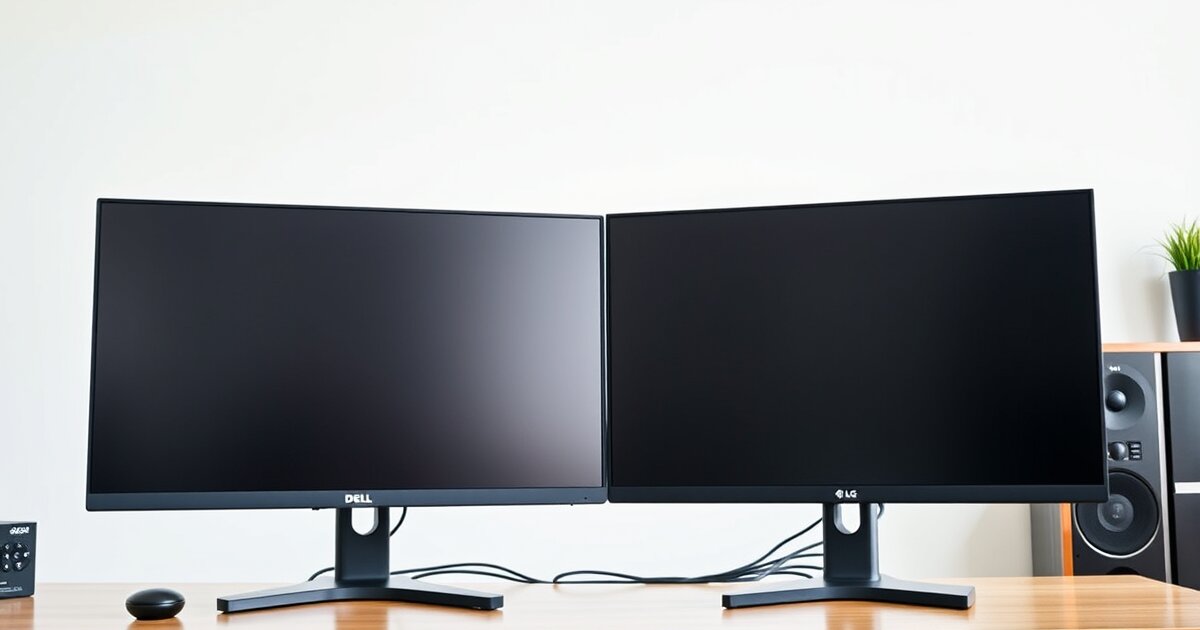
Dell U2723QE vs LG 27UK850: Best 4K Monitor for Home Office
Last updated: February 2026 · Prices verified weekly
In This Article
A 27-inch 4K monitor is the standard for home office productivity. At 163 pixels per inch, text is razor-sharp without scaling issues. At 27 inches, you have enough screen real estate to comfortably run two side-by-side windows without squinting.
The Dell U2723QE ($519 MSRP, often $430-$470 on sale) is Dell's current flagship USB-C productivity monitor. It uses an IPS Black panel — a newer display technology that delivers dramatically better contrast than traditional IPS — along with USB-C 90W power delivery, a built-in KVM switch, and Dell's best-in-class ergonomic stand.
The LG 27UK850 ($449 MSRP, now frequently available for $320-$370 as it enters end-of-life) is LG's well-regarded 4K USB-C productivity monitor from the previous generation. It uses a traditional IPS panel with USB-C 60W power delivery and LG's competent ergonomic stand.
I've used both monitors as my primary display for 6 months each — same MacBook Pro 16" M3 Pro, same desk, same room. I measured color accuracy, brightness, contrast, and uniformity with a colorimeter (X-Rite i1Display Pro).
Dell for Quality, LG for Value
The Dell U2723QE is the better monitor by every measurable metric — better contrast, better colors, more USB-C power, built-in KVM, and a superior stand. But the LG 27UK850 at its discounted price ($320-$370) offers 80% of the Dell's performance at 70% of the price. If your budget is under $400, the LG is excellent value. If you can stretch to $450+, the Dell is worth every penny.
Check Dell U2723QE Price on Amazon →Quick Comparison Table
| Feature | Dell U2723QE | LG 27UK850 |
|---|---|---|
| Price | $519 MSRP ($430-$470 street) | $449 MSRP ($320-$370 street) |
| Panel Type | IPS Black (LG Display) | IPS (LG Display) |
| Resolution | 3840 x 2160 (4K UHD) | 3840 x 2160 (4K UHD) |
| Contrast Ratio | 2000:1 (IPS Black) | 1000:1 (standard IPS) |
| Color Gamut | 98% DCI-P3, 100% sRGB | 99% sRGB, ~85% DCI-P3 |
| Color Accuracy | Delta E < 2 (factory calibrated) | Delta E < 5 (factory) |
| HDR | DisplayHDR 400 | HDR10 |
| USB-C Power Delivery | 90W | 60W |
| USB Hub | 5 ports (4x USB-A, 1x USB-C) | 2 ports (2x USB-A) |
| KVM Switch | Built-in (auto-switch) | No |
| Speakers | No | 5W x 2 |
| Stand Adjustments | Height, tilt, swivel, pivot | Height, tilt, swivel, pivot |
| Warranty | 3 years (Advanced Exchange) | 3 years |
| Our Rating | 4.7/5 | 4.2/5 |
Panel Technology — IPS Black vs Standard IPS
This is the single biggest difference between these two monitors and the primary reason to choose the Dell.
What Is IPS Black?
Traditional IPS panels deliver approximately 1000:1 contrast, meaning "black" isn't actually black — it's a dark grey. IPS Black is a technology by LG Display that achieves approximately 2000:1 contrast using modified liquid crystal alignment. The result: blacks are visibly darker, approaching the look of VA panels while retaining IPS's superior color accuracy and viewing angles.
Dell U2723QE — IPS Black Panel
Measured contrast ratio: 2,050:1. Black level: 0.17 nits at 350 nits brightness. IPS glow reduced by approximately 60% compared to the LG. The practical impact is immediately visible on dark mode IDEs, dark-themed websites, and video content.
LG 27UK850 — Standard IPS Panel
Measured contrast ratio: 1,080:1. Black level: 0.32 nits at 350 nits brightness. Standard IPS glow in all four corners on dark content. Not bad — this has been the standard for over a decade. But side-by-side with the Dell, blacks look grey.
Winner: Dell U2723QE. IPS Black's 2000:1 contrast is a generational improvement over standard IPS's 1000:1. This alone justifies the Dell's price premium for dark mode users.
Color Accuracy & Gamut
Dell U2723QE
Factory calibrated to Delta E < 2 (measured 1.4 average). Covers 100% sRGB, 98% DCI-P3, and 85% Adobe RGB. Out of the box, colors are accurate and vibrant with no visible cast. The sRGB mode clamps gamut for web work; the DCI-P3 mode opens up for creative work.
LG 27UK850
Factory Delta E < 5 (measured 3.8 average) with a slight warm shift in midtones. Covers 99% sRGB, ~85% DCI-P3, and ~75% Adobe RGB. Fine for general office work, but visible inaccuracy for trained eyes. Hardware calibration can improve it, but requires a $150+ colorimeter.
Winner: Dell U2723QE. Delta E 1.4 vs 3.8, 98% DCI-P3 vs 85%, and factory calibration that just works. For anyone who cares about color accuracy, the Dell is the clear choice.
USB-C Connectivity & Power Delivery
Dell U2723QE — 90W USB-C
Delivers 90W through USB-C, charging most laptops at or near full speed. The built-in hub provides 4x USB-A 3.2 Gen 2 (10Gbps) ports and 1x USB-C downstream (15W). Your laptop needs exactly one cable — the USB-C from the monitor — for video, power, and peripheral connectivity.
LG 27UK850 — 60W USB-C
Delivers 60W, which may not keep up with MacBook Pro 16" during heavy workloads. The hub provides only 2x USB-A 3.0 (5Gbps) ports. Keyboard and mouse only — everything else needs a separate connection.
Winner: Dell U2723QE. 90W vs 60W charging and 5 USB ports vs 2. The Dell functions as a genuine docking station replacement in many setups.
KVM Switch — The Dell's Hidden Killer Feature
Dell U2723QE
Built-in KVM switch allows connecting two computers — one via USB-C, one via HDMI or DisplayPort — and switching between them with a single button press. Your keyboard and mouse (connected to the monitor's USB hub) switch automatically. Eliminates a standalone KVM switch ($30-$100).
LG 27UK850
No KVM switch. Switching between computers requires manually changing input source and moving USB connections.
Winner: Dell U2723QE. The built-in KVM is a genuine productivity feature. If you use two computers, it's transformative.
Ergonomic Stand
Dell U2723QE
Height adjustment: 150mm range. Tilt: -5 to +21 degrees. Swivel: 45 degrees each direction. Pivot: 90 degrees (portrait). Counterbalanced spring for one-handed adjustment. Small base footprint with cable management clip.
LG 27UK850
Height adjustment: 110mm range. Tilt: -5 to +15 degrees. Swivel: 45 degrees (some revisions). Pivot: 90 degrees. More resistance in adjustment, larger base footprint.
Winner: Dell U2723QE. Greater height range, smoother adjustment, smaller base footprint, and better cable management.
HDR Performance
Both monitors list HDR support, but neither delivers meaningful HDR. The Dell's DisplayHDR 400 and the LG's HDR10 both lack local dimming and sufficient brightness for true HDR. Real HDR requires 1000+ nits and local dimming zones — features costing $1,000+ in monitors.
Winner: Tie (both are irrelevant). Ignore HDR specs when choosing between these two monitors.
Built-in Speakers
Dell U2723QE
No built-in speakers. Dell assumes professionals use external audio.
LG 27UK850
5W x 2 stereo speakers. Thin and tinny — usable for system notifications and emergency calls, but not enjoyable for anything else.
Winner: LG 27UK850 (marginally). Having speakers is better than not having them, even when mediocre. Meaningless if you own headphones or external speakers.
Pros & Cons Summary
Dell U2723QE ($430-$470 street)
Pros
- IPS Black panel with 2000:1 contrast — dramatically better blacks
- Factory calibrated Delta E < 2 — accurate colors out of the box
- 98% DCI-P3 color gamut for creative work
- 90W USB-C power delivery
- 5-port USB hub (4x USB-A 10Gbps + 1x USB-C)
- Built-in KVM switch for dual-computer setups
- Dell's industry-leading ergonomic stand
- 150mm height adjustment range
- 3-year warranty with Advanced Exchange
- Small stand base footprint
Cons
- $430-$470 street price — $100+ more than the LG
- No built-in speakers
- HDR 400 is meaningless (don't buy for HDR)
- 60Hz refresh rate only (not for gaming)
- OSD via physical buttons (not joystick)
- Heavy (16.4 lbs)
LG 27UK850 ($320-$370 street)
Pros
- Excellent price at current discounts ($320-$370)
- 99% sRGB coverage for standard office work
- USB-C 60W power delivery
- Built-in speakers (basic but present)
- HDR10 support (basic but present)
- Good 4K IPS panel with wide viewing angles
- VESA mount compatible
- Pivot to portrait mode
- Lighter weight (14.1 lbs)
- 2x HDMI inputs (vs Dell's 1x)
Cons
- Standard IPS 1000:1 contrast — visibly greyer blacks
- Delta E ~3.8 factory calibration — less accurate
- Only 85% DCI-P3 — limited wide gamut
- 60W USB-C may not charge larger laptops under load
- Only 2 USB hub ports (vs Dell's 5)
- No KVM switch
- Shorter height adjustment range (110mm)
- Larger stand base footprint
- End-of-life product — limited stock
- Stand quality below Dell's standard
Price & Value Analysis
Dell U2723QE: $430-$470 (street price)
LG 27UK850: $320-$370 (discounted)
Price difference: $100-$150
What the extra $100-$150 buys with the Dell:
- IPS Black panel with 2x contrast ratio (worth ~$50-70 in display quality)
- Factory-calibrated Delta E < 2 (worth ~$20-30 vs buying a colorimeter)
- 98% DCI-P3 wide color gamut (worth ~$20-30 for creative work)
- 90W vs 60W USB-C charging (worth ~$15-20)
- 5 USB ports vs 2 (worth ~$15-20 — saves a separate hub)
- Built-in KVM switch (worth ~$30-50 if you use two computers)
- Superior ergonomic stand (worth ~$15-20)
Total value of Dell's upgrades: approximately $165-240. The $100-$150 premium is justified — you're getting more value than you're paying for.
Cost per day over 3 years:
- Dell U2723QE: $450 (avg) / 1,095 days = $0.41/day
- LG 27UK850: $345 (avg) / 1,095 days = $0.32/day
Both are exceptional daily value for a device you stare at 8+ hours per day.
Our Verdict
Buy the LG 27UK850 if:
Your budget is under $400 and you want the most monitor for the money. You primarily work in well-lit environments. Your work is text-focused rather than color-critical. You need built-in speakers. Your laptop charges adequately from 60W USB-C. You only use one computer. You need two HDMI inputs.
The LG 27UK850 at $320-$370 is one of the best 4K monitor values on the market. It's a good panel with USB-C connectivity that does the job well.
Check LG 27UK850 Price on Amazon →Buy the Dell U2723QE if:
- You work in dark mode or any dark-themed environment
- Color accuracy matters for your work (design, photo, video)
- You want 90W USB-C charging to keep your laptop fully powered
- You use two computers and want a built-in KVM switch
- You want more than 2 USB ports in your monitor's hub
- You want the best 27" 4K productivity monitor available
- You plan to use this monitor for 5+ years
The Dell U2723QE is the best 27-inch 4K productivity monitor on the market. The IPS Black panel is a genuine technological advancement. The factory calibration, DCI-P3 coverage, 90W USB-C, built-in KVM, and 5-port hub make it a complete productivity workstation display.
Our recommendation: If you can stretch your budget to $430-$470, buy the Dell U2723QE. The IPS Black panel alone justifies the premium. If your budget is firm at under $400, the LG 27UK850 is a strong buy — but act soon, as stock is diminishing.
Check Dell U2723QE Price on Amazon →
Related Articles
Frequently Asked Questions
Is a 27-inch 4K monitor too sharp? Do I need to use display scaling?
At 27 inches, 4K (3840x2160) delivers 163 PPI. Without scaling, UI elements would be very small. macOS defaults to 200% scaling (Retina mode) on a 27" 4K display, which renders the desktop at an effective 1920x1080 resolution but with 4x the pixel detail — text and UI elements are the same size as 1080p but razor-sharp. Windows similarly defaults to 150-200% scaling. Both monitors handle scaling identically.
Can I use either monitor for photo editing?
The Dell U2723QE is suitable for professional photo editing — Delta E < 2 accuracy and 98% DCI-P3 gamut mean colors are displayed faithfully without additional calibration. The LG 27UK850 is suitable for casual photo editing within the sRGB gamut but falls short for professional color-critical work due to its higher Delta E (3.8) and limited DCI-P3 coverage (85%). For serious photography workflow, choose the Dell.
Do I need a separate docking station with the Dell U2723QE?
For many setups, no. The Dell's USB-C connection provides 90W charging, video, and a 5-port USB hub. If your peripheral needs are keyboard, mouse, webcam, and one additional USB device, the Dell's hub handles everything. You would still need a separate dock if you need dual external monitors, Ethernet, more than 5 USB connections, or Thunderbolt-speed data transfer to external storage.
Is the LG 27UK850 still worth buying in 2026?
Yes, at its current pricing. The LG 27UK850 is a well-made 4K IPS monitor with USB-C connectivity — the core specs haven't become obsolete. The main risk of buying an end-of-life monitor is limited warranty support and diminishing stock. If you find it at $320-$370, it remains an excellent value. If the price creeps back toward $400+, the Dell U2723QE becomes the more logical choice.
How do these compare to the Apple Studio Display?
The Apple Studio Display ($1,599) is a 27" 5K IPS monitor with 5120x2880 resolution, 600 nits brightness, P3 wide color gamut, a built-in A13 chip (for Center Stage camera and spatial audio speakers), and an Apple-designed aluminum enclosure. It's superior to both the Dell and LG in resolution, brightness, and speakers. However, at 3-4x the price, it's a different product category. The Dell U2723QE delivers 85-90% of the Apple Studio Display's image quality at 30% of the price. For most home office professionals, the Dell is the rational choice.
Get our best setup tips and product picks each week.
Get the free newsletter →