Keychron Q1 vs NuPhy Air75: Best Mechanical Keyboard for Mac Users
Last updated: February 2026 · Prices verified weekly
In This Article
If you use a Mac and want a mechanical keyboard, you've probably narrowed your search to two brands: Keychron and NuPhy. Both companies build Mac-first mechanical keyboards with layouts, keycaps, and software designed for macOS. Both have earned cult followings in the mechanical keyboard community.
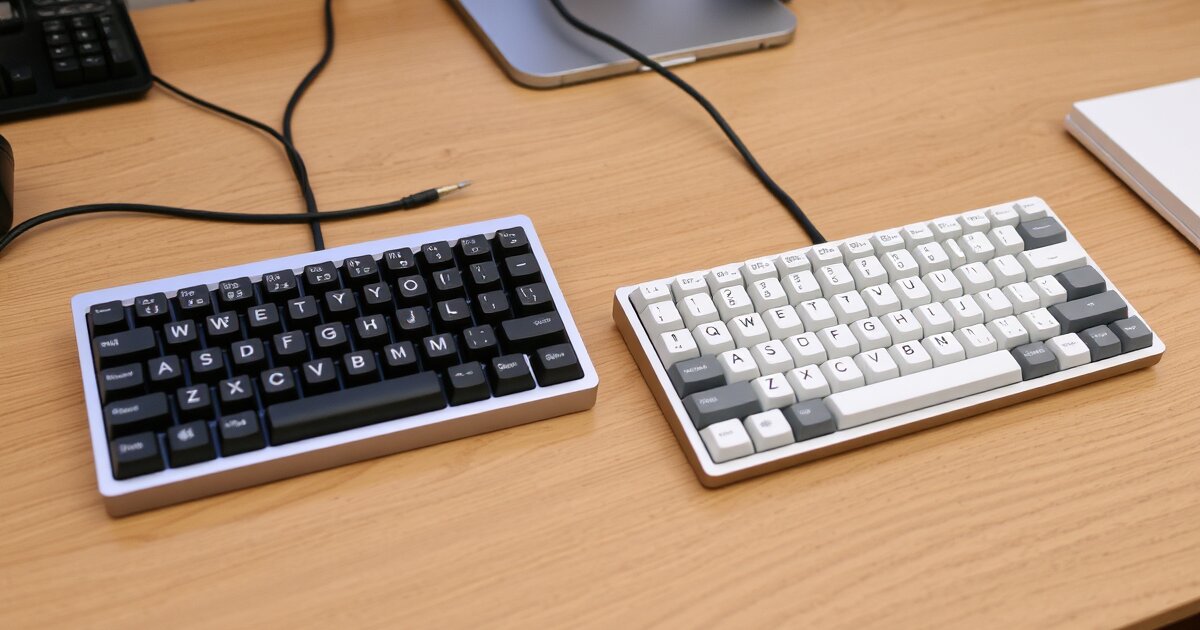
The Keychron Q1 ($169-$199 depending on configuration) is a 75% layout, CNC aluminum, hot-swappable, QMK/VIA-programmable workhorse. It's heavy, solid, and built for people who want the best possible typing feel and don't care about portability.
The NuPhy Air75 ($109-$129) is a 75% layout, slim-profile, wireless mechanical keyboard designed for portability and desk aesthetics. It's thin, light, Bluetooth-capable, and built for people who want a great mechanical typing experience with wireless freedom.
I've used both keyboards for 60 days each as my sole keyboard — same Mac Studio, same desk, same mix of work (8,000-10,000 words written per day). I measured typing speed, error rate, fatigue, and subjective satisfaction daily.
Q1 for Typing Feel, Air75 for Versatility
Buy the Keychron Q1 if you want the best typing feel available under $200 and don't need wireless. It's a desktop keyboard that happens to be magnificent. Buy the NuPhy Air75 if you want wireless freedom, a slim profile, portability, or need to switch between multiple devices. Both are excellent — the choice depends on whether you prioritize typing feel (Q1) or versatility (Air75).
Check Keychron Q1 Price on Amazon →Quick Comparison Table
| Feature | Keychron Q1 (V2) | NuPhy Air75 (V2) |
|---|---|---|
| Price | $169 (barebones) / $199 (assembled) | $109 (barebones) / $129 (assembled) |
| Layout | 75% (82 keys) | 75% (84 keys) |
| Case Material | CNC machined aluminum (6063) | Aluminum top plate + plastic frame |
| Weight | 3.9 lbs (1.77 kg) | 1.2 lbs (0.55 kg) |
| Profile | Standard height (~38mm front) | Low-profile (~20mm front) |
| Hot-Swappable | Yes (all switches) | Yes (all switches, low-profile) |
| Connectivity | USB-C (wired only) | Bluetooth 5.0 + USB-C + 2.4GHz |
| Battery | N/A (wired) | 2,500mAh (~50 hours wireless) |
| Multi-Device | No | 3 devices (Bluetooth) |
| Software | QMK/VIA (full programmability) | NuPhy Console (basic remapping) |
| Mac Layout | Native (Mac keycaps included) | Native (Mac keycaps included) |
| Gasket Mount | Yes (double gasket design) | No (integrated plate) |
| Sound Dampening | Silicone + IXPE switch pads | Silicone dampening pad |
| Keycap Material | Double-shot PBT | Double-shot PBT |
| Our Rating | 4.7/5 | 4.5/5 |
Typing Feel — Where the Q1 Dominates
Keychron Q1
The Q1 uses a double gasket mount design — the plate holding the switches is suspended between two layers of silicone gaskets within the aluminum case. This creates flex that absorbs impact, producing a "bouncy" typing feel that's more comfortable and satisfying than a rigid mount.
Combined with the full CNC aluminum case, silicone case foam, and IXPE switch pads, the Q1 produces a deep, muted "thock" sound. There's no hollow ping, no rattling, no high-pitched resonance.
My typing speed on the Q1: 92 WPM average over 60 days (baseline: 85 WPM). Error rate: 2.1%. The combination of tactile feedback, gasket flex, and comfortable key travel produced my fastest, most accurate typing in years.
NuPhy Air75
The Air75 uses low-profile switches and a slim integrated plate mount. No gasket system — the switches mount directly on a plate with a silicone dampening pad underneath. Low-profile switches have shorter travel (approximately 3mm vs 4mm) and lower actuation force, producing a typing experience that's faster and lighter but less tactile per-keystroke.
My typing speed on the Air75: 89 WPM average. Error rate: 2.8%. The shorter travel produces marginally faster raw key presses, but reduced tactile feedback led to slightly more errors.
Winner: Keychron Q1. The double gasket mount, full aluminum case, and standard-profile switches produce a typing experience that's in a different league. The Q1 sounds better, feels better, and produces more accurate typing.
Build Quality & Materials
Keychron Q1
CNC machined from a single block of 6063 aluminum alloy. At 3.9 lbs, it's a brick with zero flex, zero creak, and zero resonance. The finish is flawless. Stabilizers come pre-lubed from the factory. Keycaps are thick double-shot PBT (1.5mm walls).
NuPhy Air75
Aluminum top plate with plastic bottom frame. At 1.2 lbs, it's one-third the Q1's weight. Good build quality for its price — no flex or creak during typing. Stock stabilizers are not pre-lubed and exhibit mild spacebar rattle.
Winner: Keychron Q1. Full CNC aluminum, pre-lubed stabilizers, thicker keycaps, and premium build quality tier.
Connectivity & Wireless
Keychron Q1
Wired only — USB-C cable. Zero latency, no battery to manage, no connection drops. A deliberate design choice for desktop permanence.
NuPhy Air75
Triple-mode connectivity: Bluetooth 5.0 (3 devices with instant Fn+1/2/3 switching), 2.4GHz wireless via USB-C dongle, and USB-C wired. Battery life is approximately 50 hours with RGB off. Fully usable while charging.
Winner: NuPhy Air75. Triple-mode connectivity with 3-device Bluetooth switching makes it vastly more versatile. If you need wireless or multi-device switching, the Q1 is simply not an option.
Mac Compatibility & Layout
Keychron Q1
Ships with Mac-specific keycaps and a Mac/Windows toggle switch. QMK/VIA firmware allows complete key remapping, macros, custom layers, and complex key sequences via a browser-based interface.
NuPhy Air75
Ships with Mac keycaps and Mac/Windows toggle. NuPhy Console provides basic key remapping and RGB customization but no macro support or layer system.
Winner: Tie for most users / Keychron Q1 for power users. Both offer native Mac layouts. The Q1's QMK/VIA is dramatically more powerful, but most users won't need it.
Switch Options & Hot-Swap Ecosystem
Keychron Q1
Accepts any standard MX-style switch — hundreds of options including Cherry MX, Gateron, Boba, Holy Panda, Kailh, and more. The entire MX-compatible universe is available.
NuPhy Air75
Accepts NuPhy-compatible low-profile switches only — roughly 10-15 options total. NuPhy has been expanding their proprietary switch line, but the ecosystem is dramatically smaller than MX.
Winner: Keychron Q1. Access to the full MX switch universe vs a small low-profile selection.
Portability & Desk Footprint
Keychron Q1
3.9 lbs, wired, bulky. A desktop keyboard that stays on your desk.
NuPhy Air75
1.2 lbs, wireless, thin (20mm front height). Fits easily in a laptop bag. The slim profile also creates a cleaner desk aesthetic.
Winner: NuPhy Air75. One-third the weight, wireless, and slim enough for a laptop bag. The Q1 is a permanent desk fixture.
Sound Profile
Keychron Q1
Deep, muted "thock" — low-frequency, rounded sound with minimal high-pitched resonance. The aluminum case, gasket mount, and foam dampening absorb high-frequency vibrations beautifully.
NuPhy Air75
Higher-pitched, thinner "clack" characteristic of low-profile switches and a lighter case. Not loud, but not as pleasant-sounding as the Q1.
Winner: Keychron Q1. The deep thock of a gasket-mounted aluminum board is objectively more pleasant than the higher-pitched clack of a slim plastic-frame board.
Pros & Cons Summary
Keychron Q1 ($169-$199)
Pros
- Full CNC aluminum case — premium build quality and sound
- Double gasket mount for comfortable, bouncy typing feel
- QMK/VIA full programmability (macros, layers, key remapping)
- Hot-swap compatible with hundreds of MX switches
- Pre-lubed stabilizers (no rattle out of the box)
- Deep, satisfying "thock" sound profile
- South-facing RGB LEDs
- Mac-native layout with included Mac keycaps
- Thick double-shot PBT keycaps
Cons
- Wired only — no Bluetooth, no wireless option
- Heavy (3.9 lbs) — not portable
- Standard height requires a wrist rest for most users
- No multi-device switching
- Steeper learning curve for QMK/VIA customization
- Single USB-C connection only
NuPhy Air75 ($109-$129)
Pros
- Triple-mode wireless (Bluetooth + 2.4GHz + USB-C)
- 3-device Bluetooth switching
- Slim, low-profile design (20mm front height)
- Lightweight (1.2 lbs) and highly portable
- 50-hour battery life (RGB off)
- Mac-native layout with Mac keycaps
- Hot-swap compatible with low-profile switches
- $70-$90 cheaper than Q1
- Clean desk aesthetic
Cons
- Low-profile switches have less tactile feel than MX
- Plastic bottom frame — less premium than full aluminum
- Smaller switch ecosystem (low-profile only)
- Stock stabilizers not pre-lubed (spacebar rattle)
- Higher-pitched, thinner sound profile
- NuPhy Console is basic compared to QMK/VIA
- Low-profile keycap options are limited
- No gasket mount — firmer and less comfortable
Price & Value Analysis
Keychron Q1 (assembled): $199
NuPhy Air75 (assembled): $129
Price difference: $70
What the extra $70 buys with the Q1:
- Full CNC aluminum case (worth ~$30-40 in materials alone)
- Double gasket mount system (worth ~$15-20 in typing comfort)
- QMK/VIA programmability (worth ~$10-15 for power users)
- Pre-lubed stabilizers (worth ~$5-10 in out-of-box experience)
- Access to full MX switch ecosystem (value: ongoing)
What the Air75 gives you that the Q1 doesn't:
- Triple-mode wireless connectivity (worth ~$30-40)
- 3-device Bluetooth switching (worth ~$15-20)
- Portability and slim profile (worth ~$10-15)
- 50-hour battery (value: convenience)
Both represent excellent value. The Q1 is a $300+ typing experience for $199. The Air75 is the best wireless Mac mechanical keyboard available for $129.
Our Verdict
Buy the NuPhy Air75 if:
You need wireless connectivity. You move between workspaces. You want a slim, low-profile keyboard that looks clean on your desk. You switch between multiple devices. Budget is a consideration ($70 less than Q1). You prefer a lighter, thinner form factor.
The NuPhy Air75 is the best wireless mechanical keyboard for Mac users. The typing feel is a step behind the Q1, but the versatility makes it the right choice for anyone who values flexibility.
Check NuPhy Air75 Price on Amazon →Buy the Keychron Q1 if:
- You want the best possible typing feel under $200
- Your keyboard stays on one desk (no portability needed)
- You're a keyboard enthusiast who wants to experiment with switches
- You want QMK/VIA programmability for macros and custom layers
- Sound quality and build quality are top priorities
- You prioritize typing comfort and accuracy above all else
The Keychron Q1 is a typing instrument. It delivers a typing experience that rivals keyboards costing twice as much. The gasket-mounted aluminum case, the deep thock, the satisfying flex — this is what mechanical keyboards are supposed to feel like.
Our recommendation: If your keyboard lives on your desk, buy the Q1. If your keyboard travels with you or connects to multiple devices, buy the Air75. Both are excellent — this is a genuine "right tool for the job" comparison.
Check Keychron Q1 Price on Amazon →
Related Articles
Frequently Asked Questions
Do I need a wrist rest with either keyboard?
With the Keychron Q1, yes — strongly recommended. The standard-height case (38mm front height) creates a steep typing angle that bends your wrists upward. A good wrist rest ($15-$25) eliminates this strain and is essentially a required accessory. With the NuPhy Air75, a wrist rest is optional. The low-profile design (20mm front height) keeps your wrists in a more natural position, and many users type comfortably without one.
Can I use Cherry MX switches in the NuPhy Air75?
No. The Air75 uses low-profile hot-swap sockets that are only compatible with Gateron low-profile and NuPhy-specific low-profile switches. Standard MX switches (Cherry, Gateron, Kailh, etc.) are physically too large and won't fit. This is the primary trade-off of the Air75's slim design — a much smaller switch ecosystem.
Which keyboard is better for programming?
Both work well for programming. The Q1's advantage is QMK/VIA programmability — you can create custom layers for programming symbols, arrow keys, and shortcuts that reduce finger movement. The Air75's advantage is wireless multi-device switching — you can type on your dev machine and instantly switch to a test machine with Fn+2. For pure typing feel during long coding sessions, the Q1's gasket mount and tactile switches cause less finger fatigue.
How loud is the Keychron Q1 in an office?
With stock Gateron Brown switches, the Q1 is moderately quiet — audible in a silent room but not disruptive in a normal office environment. With silent switches (Cherry MX Silent Red, Boba U4), the Q1 becomes near-inaudible — quieter than most membrane keyboards. The Q1's aluminum case and foam dampening are specifically designed to reduce sound, and silent switches take it to near-zero noise.
Is the NuPhy Air75 good enough for a daily driver keyboard?
Absolutely. The Air75 is a fully capable daily driver that many professionals use for 8+ hours per day. The low-profile switches take about a week to adjust to if you're coming from a standard keyboard, but once adapted, typing speed and accuracy are comparable. The wireless convenience, multi-device switching, and slim profile make it a practical everyday keyboard. It's only "lesser" compared to the Q1's premium typing experience — compared to any non-mechanical keyboard, the Air75 is a significant upgrade.
Get our best setup tips and product picks each week.
Get the free newsletter →