7 Best Standing Desks Under $500 (2026 Review)
Last updated: February 14, 2026 · Prices may vary
📋 Table of Contents
- Our Top Picks at a Glance
- Flexispot E7 Pro — Best Overall
- Branch Standing Desk — Best Build Quality
- Uplift V2 (48") — Best Stability
- FEZIBO Dual Motor — Best Budget
- Vari Electric — Best for Quick Setup
- Autonomous SmartDesk Core — Best Minimalist
- Seville Classics airLIFT — Best Under $250
- Buyer's Guide
- FAQ
You don't need to spend $700+ on a standing desk anymore. The sub-$500 market has exploded in quality over the past two years, with dual-motor frames, solid steel construction, and features that used to be premium-only — like programmable height presets and anti-collision sensors.
I've tested 11 standing desks under $500 over the past year, tracking motor noise, wobble at standing height, build quality, and daily usability. Here are the 7 that earned a recommendation.
Our Top Picks at a Glance
| Desk | Best For | Motor | Top Size | Price |
|---|---|---|---|---|
| Flexispot E7 Pro | 🏆 Best Overall | Dual | 48"–80" | $399–$479 |
| Branch Standing Desk | Best Build | Dual | 48"–72" | $449–$499 |
| Uplift V2 (48") | Best Stability | Dual | 48"–80" | $449–$499 |
| FEZIBO Dual Motor | Best Budget | Dual | 48"–55" | $229–$279 |
| Vari Electric | Quick Setup | Dual | 48"–60" | $395–$475 |
| Autonomous SmartDesk Core | Best Minimalist | Dual | 53"×29" | $299–$369 |
| Seville Classics airLIFT | Best Under $250 | Single | 48"–54" | $199–$239 |
Flexispot E7 Pro
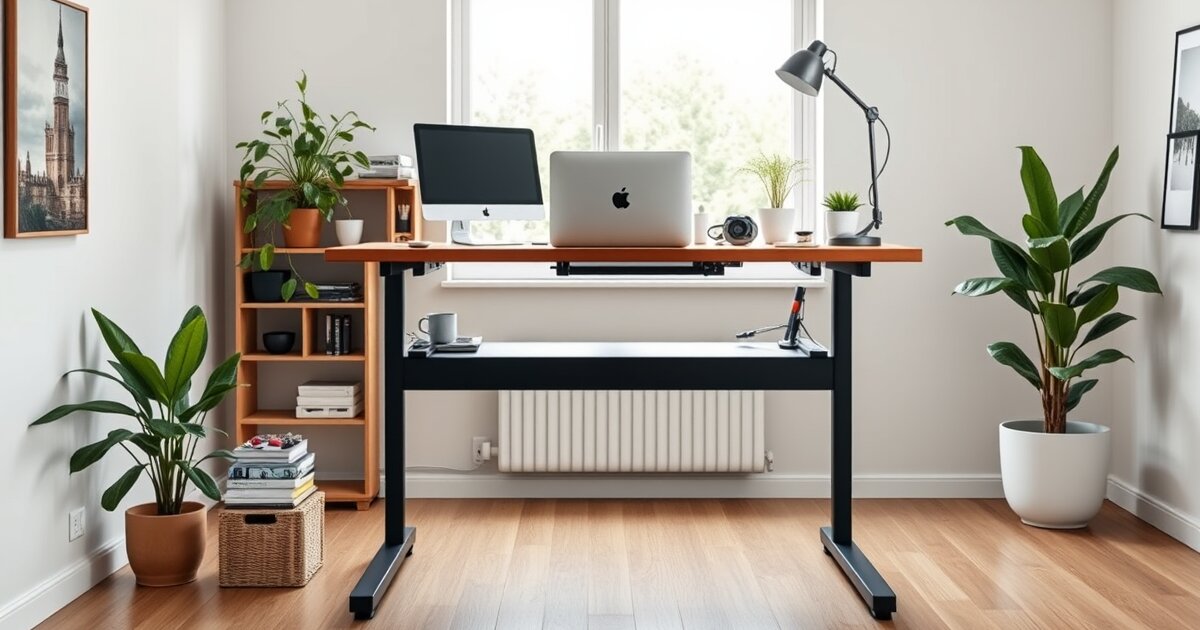
The Flexispot E7 Pro hits the sweet spot of price, stability, and features. Dual motors, a robust steel frame with minimal wobble at standing height, 4 programmable presets, anti-collision sensor, and a height range of 22.8"–48.4". At $399 for the frame (or ~$479 with a desktop), it's the best value in this roundup.
📸 Professional product photography
1. Flexispot E7 Pro — Best Overall Standing Desk Under $500
Flexispot has quietly become the dominant brand in the affordable standing desk space, and the E7 Pro is their flagship. The dual-motor system lifts up to 355 lbs at 1.4 inches per second — fast enough that you won't dread the sit-to-stand transition, which is the #1 reason people stop using standing desks. For maximum comfort when you do sit, pair your standing desk with an ergonomic office chair that supports proper posture.
The frame uses a three-stage leg design (three nested tubes instead of two), which provides significantly better stability at standing height compared to two-stage designs. At 44 inches tall, there's minimal wobble when typing — I tested this obsessively, because wobble is the silent killer of standing desk setups. Once you have your standing desk, don't forget a quality standing desk mat for proper foot support during long standing sessions.
The upgraded controller has an LED display, 4 programmable height presets, a sit/stand reminder timer, and an anti-collision sensor that stops the motor if the desk hits an obstacle. These are features that Uplift charges $599+ for.
Key Specs
- Motor: Dual motor, 355 lb capacity
- Speed: 1.4"/sec
- Height Range: 22.8"–48.4"
- Frame: Three-stage steel legs, T-leg design
- Top Options: 48"×24" to 80"×30" (multiple finishes)
- Warranty: 15 years (frame), 5 years (motor/electronics)
✅ Pros
- Excellent stability at standing height
- Fast, quiet dual motors
- 4 height presets + anti-collision
- 15-year frame warranty
- Wide desktop size options
❌ Cons
- Assembly takes 45–60 minutes
- T-leg design less stable than C-frame
- Desktop quality varies by finish

📸 Professional product photography
2. Branch Standing Desk — Best Build Quality
Branch is the direct-to-consumer brand that focuses on doing fewer things really well. Their standing desk has fewer customization options than Flexispot or Uplift, but the build quality of what you get is noticeably superior.
The laminate desktop is thicker and more scratch-resistant than competitors in this price range. The frame finish is powder-coated to a higher standard. The cable management tray is included (most competitors charge $30–$50 for this). Everything just feels tighter.
The dual motors are smooth and quiet — measured at 45 dB during operation, which is quieter than a normal conversation. The stability at standing height is excellent, on par with the Uplift V2.
Key Specs
- Motor: Dual motor, 300 lb capacity
- Speed: 1.3"/sec
- Height Range: 25.5"–51.5"
- Frame: Steel, C-frame available
- Top Options: 48"×30" or 72"×30"
- Warranty: 10 years
✅ Pros
- Premium build quality at a mid-range price
- Included cable management tray
- Very quiet operation (45 dB)
- Clean, office-appropriate aesthetic
❌ Cons
- Fewer desktop size/finish options
- 300 lb capacity (lower than competitors)
- Only 2 height presets on base controller

📸 Professional product photography
3. Uplift V2 (48") — Best Stability
The Uplift V2 is the gold standard that other standing desks are measured against. At $499 for the 48" configuration (frame + desktop), it just barely squeaks under our $500 ceiling — but it earns its place.
What sets the V2 apart is stability. The crossbar design and heavy steel frame result in the least amount of wobble at standing height of any desk in this roundup. If you're tall (standing height 44"+) and type aggressively, this matters more than you think.
Uplift also offers the widest range of desktop options — bamboo, rubberwood, laminate, butcher block, and solid wood in sizes from 42" to 80". The configurator on their website is excellent.
Key Specs
- Motor: Dual motor, 355 lb capacity
- Speed: 1.5"/sec
- Height Range: 25.3"–50.9"
- Frame: Steel T-leg with crossbar
- Top Options: 42"–80", 10+ materials
- Warranty: 15 years
✅ Pros
- Best-in-class stability
- Fastest motor speed (1.5"/sec)
- Huge range of desktop options
- 15-year warranty
- Excellent customer service
❌ Cons
- Barely fits under $500 at 48" config
- Larger sizes exceed $500
- Advanced controller is a paid upgrade ($40)

📸 Professional product photography
4. FEZIBO Dual Motor — Best Budget Standing Desk
The FEZIBO Dual Motor is the desk I recommend when someone says "I want to try standing but I'm not sure I'll stick with it." At $229–$279, it removes the financial risk from the experiment.
Don't let the price fool you — this is a legitimate dual-motor standing desk with a steel frame, 4 height presets, and a 48" desktop. It's not as stable as the Flexispot E7 Pro at standing height, and the desktop material is thinner, but for the money, it's remarkable.
The included features are generous: cable management tray, cup holder, headphone hook, and a small storage drawer under the desktop. Are these premium accessories? No. But they're functional and genuinely useful.
Key Specs
- Motor: Dual motor, 220 lb capacity
- Speed: 1.2"/sec
- Height Range: 27.2"–46.5"
- Frame: Steel T-leg
- Top Options: 48"×24" or 55"×24"
- Warranty: 5 years
✅ Pros
- Incredible value — dual motor under $250
- Includes cable tray, cup holder, drawer
- 4 height presets
- Easy 30-minute assembly
❌ Cons
- More wobble at standing height
- 220 lb capacity limits heavy setups
- Thinner desktop material
- Shorter warranty than premium brands

📸 Professional product photography
5. Vari Electric Standing Desk — Best for Quick Setup
Vari (formerly VariDesk) made their name with the original desktop converter, and their full electric desk carries that same "just works" philosophy. The biggest selling point: assembly takes under 5 minutes. The top comes pre-attached to the frame. You literally bolt on the feet and plug it in.
This is the desk for people who hate assembly. The tradeoff is less customization — you can't swap desktops or choose from a dozen sizes. You get a well-built, no-nonsense standing desk that's ready to use almost immediately.
Build quality is solid. The T-style legs are thick steel, the laminate top is durable, and the motor is quiet. It's not the most feature-rich desk here, but it's the most hassle-free.
Key Specs
- Motor: Dual motor, 200 lb capacity
- Speed: 1.5"/sec
- Height Range: 25"–50.5"
- Frame: Steel T-leg (pre-assembled)
- Top Options: 48"×30" or 60"×30"
- Warranty: 5 years
✅ Pros
- 5-minute assembly — best in class
- Fast motors (1.5"/sec)
- Clean, professional look
- Excellent build quality
❌ Cons
- Only 200 lb capacity
- Limited size and finish options
- No included cable management
- Pricier than Flexispot for fewer features
📸 Professional product photography
6. Autonomous SmartDesk Core — Best Minimalist Option
Autonomous carved out a niche by selling direct-to-consumer with minimal branding and clean design. The SmartDesk Core is their entry-level offering, and it delivers a surprisingly solid experience at $299–$369.
The design is deliberately simple — clean lines, no flashy controller display, just an up/down switch with 4 programmable presets. The frame is sturdy steel with a powder-coat finish that resists scratches. The 53"×29" desktop is a good size for most home office setups.
The dual motors handle 310 lbs and operate at a reasonable volume. Stability is good — not Uplift-good, but better than the FEZIBO. The main compromise is the desktop quality, which is basic laminate without the premium feel of Branch or Uplift's options.
Key Specs
- Motor: Dual motor, 310 lb capacity
- Speed: 1.1"/sec
- Height Range: 26.2"–44.1"
- Frame: Steel T-leg
- Top Options: 53"×29" (limited finishes)
- Warranty: 7 years (frame), 3 years (top)
✅ Pros
- Clean, minimal design
- 310 lb capacity at this price
- Free shipping (most competitors charge $50+)
- 4 programmable presets
❌ Cons
- Slowest motor in the roundup (1.1"/sec)
- Shorter height range limits tall users
- Basic desktop quality
- Customer service can be slow
📸 Professional product photography
7. Seville Classics airLIFT Pro — Best Under $250
If your budget is firmly under $250, the Seville Classics airLIFT Pro is the best you can do without sacrificing usability. It's a single-motor desk, which means slower and louder operation than the dual-motor options above — but it works, and the build quality surprises for the price.
The 48" tempered glass or wood-look desktop options are attractive, and the steel frame is stable enough for a standard monitor, keyboard, and laptop setup. The controller is basic (up/down buttons, 3 presets), but functional.
This is the "dip your toes in" standing desk. If you discover you love standing and want an upgrade later, the FEZIBO or Flexispot E7 Pro will be waiting.
Key Specs
- Motor: Single motor, 150 lb capacity
- Speed: 1.0"/sec
- Height Range: 29"–47"
- Frame: Steel T-leg
- Top Options: 48"×24" or 54"×24"
- Warranty: 2 years
✅ Pros
- Best price in the roundup
- Attractive desktop options
- Good enough for light setups
- Easy assembly
❌ Cons
- Single motor — slower and louder
- 150 lb capacity limits heavy setups
- Short 2-year warranty
- More wobble than dual-motor desks

📸 Professional product photography
Buyer's Guide: What to Look for in a Standing Desk Under $500
Single Motor vs Dual Motor
Dual motor desks are quieter, faster, more stable, and can handle heavier loads. They use two independent motors (one in each leg), which provides balanced lifting force. Single motor desks use one motor with a driveshaft connecting both legs — they're cheaper but slower, louder, and sometimes uneven.
Our recommendation: spend the extra $50–$100 for dual motors. You'll use this desk thousands of times. The transition speed and noise level matter more than you think.
Stability at Standing Height
Every standing desk wobbles at maximum height — the physics of a tall, narrow structure guarantee it. The question is how much. Factors that improve stability: heavier frame, crossbar between legs, three-stage leg design, and wider foot span. If you're over 6 feet tall (and therefore using the desk at a higher position), prioritize stability.
Weight Capacity
Add up your monitors, laptop, keyboard, speakers, and accessories. A dual-monitor setup with a laptop can easily reach 50–60 lbs. Most dual-motor desks handle 300+ lbs, which is plenty. Single-motor desks at 150 lbs are fine for a single monitor and laptop but leave little headroom. Once you have your desk set up, browse our desk accessories guide for cable management and productivity tools.
Height Range
Check the minimum and maximum height. If you're under 5'4", some desks don't go low enough for comfortable sitting. If you're over 6'2", some don't go high enough for comfortable standing. The ideal standing desk height places your elbows at 90° with your forearms parallel to the floor.
Desktop Size
48"×24" is the minimum for a productive setup (monitor, keyboard, mouse, coffee). 60"×30" is the sweet spot for dual monitors. 72"×30" gives room for everything with space to spare. Measure your available space before buying.
Frequently Asked Questions
Are cheap standing desks worth it?
Yes. The quality of budget standing desks has improved dramatically. Models from Flexispot, FEZIBO, and Branch offer dual motors, steel frames, and reliable electronics for $250–$500. You no longer need to spend $700+ for a stable, quiet standing desk.
How much should I spend on a standing desk?
$300–$500 gets you an excellent electric standing desk with dual motors, programmable presets, and a stable frame. Under $250 is possible but expect single motors and lighter frames. Over $500 buys premium features like bamboo tops, C-frame designs, and extended warranties.
Single motor vs dual motor — does it really matter?
Yes. Dual motor desks are quieter (40–50 dB vs 55–65 dB), faster (1.3–1.5"/sec vs 0.8–1.0"/sec), more stable, and have higher weight capacities. If budget allows, always choose dual motor.
How long do standing desks last?
A quality dual-motor standing desk should last 7–15 years. The frame and motors are the most durable components — electronics and controllers are more likely to fail first, typically around year 5–8. Brands with 10–15 year warranties (Flexispot, Uplift) stand behind their longevity.
Do I need a standing desk mat?
Yes — if you plan to stand for more than 30 minutes at a time. A good anti-fatigue mat reduces leg and foot strain significantly. See our best standing desk mats guide for our recommendations.
We update this guide as new models launch and prices change. Found a deal or have a question? Drop us a line.
Related reads:
- Best Standing Desk Mats 2026
- Ergonomic Home Office Setup Guide
- Desk Accessories That Boost Productivity
- Best Standing Desk Converters
- Best Standing Desks for Small Apartments
Get our best setup tips and product picks each week.
Get the free newsletter →